Lab - Additional Perspective on Roles and Privileges
This assignment relates to the following Course Learning Requirements:
CLR 2 - Administer a DBMS using knowledge of SQL, database security features, globalization, and database architecture (storage, memory and processes)
CLR3 - Manage database system security and privacy controls
Objectives of the Lab
This lab provides you with the opportunity to gain hands-on experience creating new Roles, grant privileges to these new Roles and grant the roles to users based on the user's requirements.
Resources:
To perform the work required in this Lab, it is necessary for the Learner to download these two SQL scripts found in the attachments:
• CST8276 Lab Table Creation SQL
• CST8276 Lab Insert SQL
Background:
Lab 4 had the Learner create a User and grant pre-defined privileges (those which Oracle DBMS provides out of the box). This Lab 5 will ask that new Roles (collections of privileges) are created as an additional step.
Lab Submission Tasks:
Predefined Privileges: Oracle classifies SYSTEM privileges as actions that apply to the system or types of objects. For example, CREATE DATABASE, CREATE TABLESPACE, and CREATE TABLE. System privileges are listed and described in Table 18.1 of Oracle's Database SQL Language Reference Guide, http://docs.oracle.com/database/121/SQLRF/statements_9013.htm#SQLRF01603
Oracle classifies OBJECT privileges as actions that apply to a particular object. For example, SELECT, INSERT, UPDATE, and DELETE actions on a specific table. Additionally, the owner of an object – say I created a table named Test - would automatically have SELECT, INSERT, UPDATE, etc. rights on Test. A user can also be granted rights on an object owned by another user – we will do this later in the current lab. Object privileges are listed and described in Table 18.2.
Start SQLPLus and logon as SYS AS SYSDBA.
1. How many predefined system privileges are listed in the system_privilege_map view:
2. How many predefined object privileges are listed in the dba_tab_privs view: (Hint: You won't want to SELECT * FROM dba_tab_privs as a large number of rows will be returned. Instead use an aggregation function to determine the number of rows in the view).
3. Creating Roles: The information on the next page describes privileges that certain users have on specific tables. Technically, we could grant the correct object privilege on each table on a user-by-user basis … but that approach is inelegant, inefficient and scales poorly – what is feasible for the first 6 users is terribly problematic for the next 30,000. A more realistic (simplified) example would be BrightSpace – it has an ever-increasing number of users assigned to the student role and approximately 1,000 users assigned to the instructor role – with each role having different privileges.
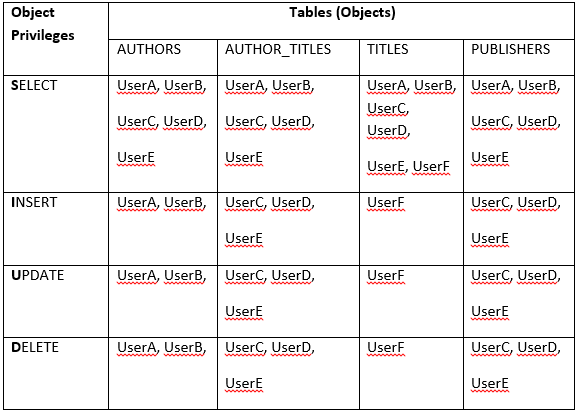
4. Take the data from the table above and re-organize it in the format below. I have done the first row for you. Doing this will help you spot the privileges/object pairings for each user more easily. (Note: S=Select, I=Insert, U=Update, and D=Delete).
Type your answers directly into this table…..
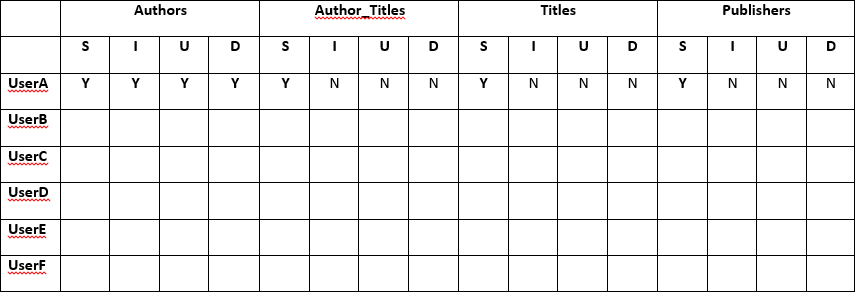
a. What is the minimum number of roles (i.e., grouping by common requirements) required to assign the correct privileges to the appropriate users? _________.
b. List the roles (e.g., role1, role2, etc.) and the users that should be assigned to each role.
5. Use the template below to create 6 users named UserA, UserB, UserC, UserD, UserE and UserF, and to grant them connect privileges.
CREATE USER UserA IDENTIFIED BY userapswd
DEFAULT TABLESPACE users
TEMPORARY TABLESPACE temp
QUOTA UNLIMITED ON users;
Grant connect to usera;
Can these users create a table? (yes/no)____ Why? ____________________________
6. Logon to your general user account (e.g., king). Use the posted create tables file to create the Authors, Author_Titles, Titles, and Publishers tables. Use the posted insert file to add data to the tables.
a. Logon as SYS AS SYSDBA and enter: CREATE ROLE Rolefname1; (for example, Roleking1). Create the number of roles you determined were needed in Question 2a above. Additional information on creating roles can be found here: http://docs.oracle.com/database/121/SQLRF/statements_6014.htm#SQLRF01311
b. Review the basic syntax for GRANTING an object privilege (e.g., SELECT, etc.) on a schema object (e.g., king.authors) to a role (e.g., Roleking1). Read the Restriction on Object Privileges sentence under Grant_Object_Privileges clause description as it contains important information regarding whether, for example, you can grant a select on king.authors and select on king.titles in the same grant statement. Granting these two privileges in two separate grant statements is fine. http://docs.oracle.com/database/121/SQLRF/statements_9013.htm#SQLRF01603
7. Enter: DESC role_tab_privs for a description of the structure of the view that contains information about roles and their privileges. You may notice the first 5 columns are unnecessarily wide for our data. Use the COLUMN / FORMAT command to modify the displayed column width. Use this example as a guide:
SQL> column role format a10
Write a SQL query that selects all columns from the role_tab_privs view for all of your newly created roles and orders the results by role, table_name, and privilege.
8. Our next step is to grant the appropriate role or roles to the correct user(s).
Granting a role to a user is very similar to granting a privilege to a role or, for that matter, granting a role to another role. Use 'g' above as a model for granting a role to a user.
Additional detailed information is available in the GRANT section of the SQL Reference Guide http://docs.oracle.com/database/121/SQLRF/statements_9013.htm#SQLRF01603
9. After all of the role granting to users has completed, enter the following command and then paste the query and results in the space provided below:
select *
from role_tab_privs
where role like 'ROLE%'
order by role, table_name, privilege;
10. To demonstrate that the GRANTs were correctly established, write the query and show the results for the following actions:
a. UserA inserting Author ID = 60 in Authors
b. UserA inserting Publisher ID = 60 in Publishers
c. UserF selecting publisher ID and Title ID from Titles
Students succeed in their courses by connecting and communicating with an expert until they receive help on their questions

Consult our trusted tutors.






 Login | Sign Up